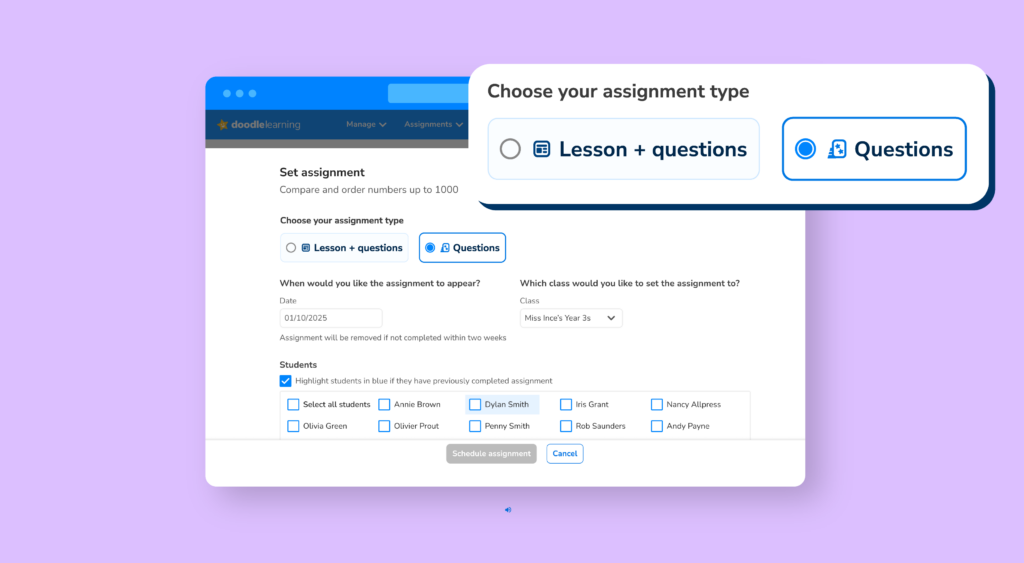
Doodle Assignments are getting even better

Doodle Assignments have always helped teachers target learning, reinforce key skills and focus pupils on exactly what they need next. Now, we’re introducing an improvement that gives you even more flexibility when assigning work.

Author

Sophie Withey,
Curriculum & Instruction Manager

Published:

May 2026

Key takeaways

You can now create QuestionOnly Assignments, giving you greater control over how pupils engage with their work.

This update has been designed in response to teacher feedback and supports more focused practice — particularly when you want pupils to concentrate on specific questions without additional support elements.

What are Doodle Assignments?

Doodle Assignments let teachers set tailored practice for individual pupils, groups or whole classes using content from across Doodle’s programmes.

Teachers can:

  • Choose what learners practise
  • Set clear expectations for completion
  • Support revision, catch‑up and consolidation
  • Use assignments alongside Doodle’s adaptive learning


Assignments are flexible enough to be used in class, for homework, or as targeted intervention.

New: Question Only Assignments

Question‑Only Assignments allow teachers to assign questions without additional scaffolding elements, helping pupils focus purely on answering the questions themselves.

This is particularly useful when you want to:

  • Check independent understanding
  • Assess confidence with a specific skill
  • Encourage careful thinking without hints or prompts
  • Provide more exam‑style or practice‑focused activities


It’s the same trusted Doodle content — just with greater control over how learners interact with it.

Why this update matters

This enhancement gives teachers more choice in how they use Doodle Assignments and makes it easier to match tasks to intent.

Whether you’re:

  • Setting focused practice
  • Reinforcing recently taught concepts
  • Supporting assessment without additional clues
 

Question‑Only Assignments help ensure pupils engage with the learning in the way you intend.

Using Assignments together

You can continue to use standard Doodle Assignments and QuestionOnly Assignments side by side, choosing the right approach for different learners, contexts or outcomes.

This update doesn’t replace existing assignment features — it builds on them.

Question‑Only Assignments are being introduced as part of ongoing improvements to Doodle’s classroom tools. Simply head to Assignments to explore the new option.

Explore Doodle for your school

Login

Are you a parent, teacher or student?

Get started for free!

Are you a parent or teacher?

Maths information pack

We ask for your contact info so we can send our info pack directly to your inbox for your convenience

Exam prep information pack

We ask for your contact info so we can send our info pack directly to your inbox for your convenience

Case studies information pack

We ask for your contact info so we can send our info pack directly to your inbox for your convenience

Information pack

We ask for your contact info so that our Education Consultants can get in touch with you and let you know a bit more about Doodle.

Student Login

Which programme would you like to use?

If you’d like to use Doodle’s browser version, please visit this page on a desktop.

To log in to Doodle on this device, you can do so through our apps. You can find out how to download them here: